
How to Write a Winning Resume
In today’s competitive job market, especially in Muskoka, having a strong resume is essential for standing out and landing your dream job. Your resume is often the first impression a potential employer will have of you, so it’s important to make it count. In this article, we’ll discuss the key elements of a good resume and provide resume writing tips for a resume that will catch the attention of hiring managers. Contact us at Employment North for free resume assistance with writing, printing, advice and more.

Where to Create a Resume
There are a variety of good places to create your resume. Using Microsoft Word, Google Docs or Canva are some common programs that are used with great results.
Microsoft Word
Microsoft Word is a popular program that can be used to create resumes with great results. It offers a wide range of features and templates that make it easy to create a professional-looking resume. With Microsoft Word, you can customize the layout, font, and formatting of your resume to make it stand out. Additionally, the program provides tools for spell checking and grammar checking, ensuring that your resume is error-free. You can also save your resume in different file formats, such as PDF or Word, making it easy to share and send to potential employers. Overall, Microsoft Word is a reliable and versatile tool for creating winning resumes.
https://www.microsoft.com/en-ca/microsoft-365/word
Google Docs
Google Docs is a free online word processing program provided by Google. It is accessible through your Gmail account and offers a convenient way to create and edit documents, including resumes. Google Docs provides a variety of features and templates that allow you to customize the layout, font, and formatting of your resume. It also offers collaboration tools, making it easy to share your resume with others and receive feedback. Additionally, Google Docs automatically saves your work as you go, ensuring that you never lose your progress. With its user-friendly interface and compatibility with different devices, Google Docs is a great option for creating a resume that is professional and visually appealing.
Canva

Canva is a graphic design platform that offers a wide range of templates and tools to create visually appealing resumes. With Canva, you can easily choose from various resume templates and customize them to suit your preferences. The platform provides a user-friendly interface that allows you to customize the layout, font, colors, and graphics of your resume. Canva also offers a vast library of free and premium images, icons, and illustrations that you can use to enhance the visual appeal of your resume. Additionally, Canva allows you to collaborate with others, making it easier to receive feedback and suggestions on your resume. Overall, Canva is a great option for creating a resume that stands out and grabs the attention of potential employers.
Real-World Examples of Good Resumes
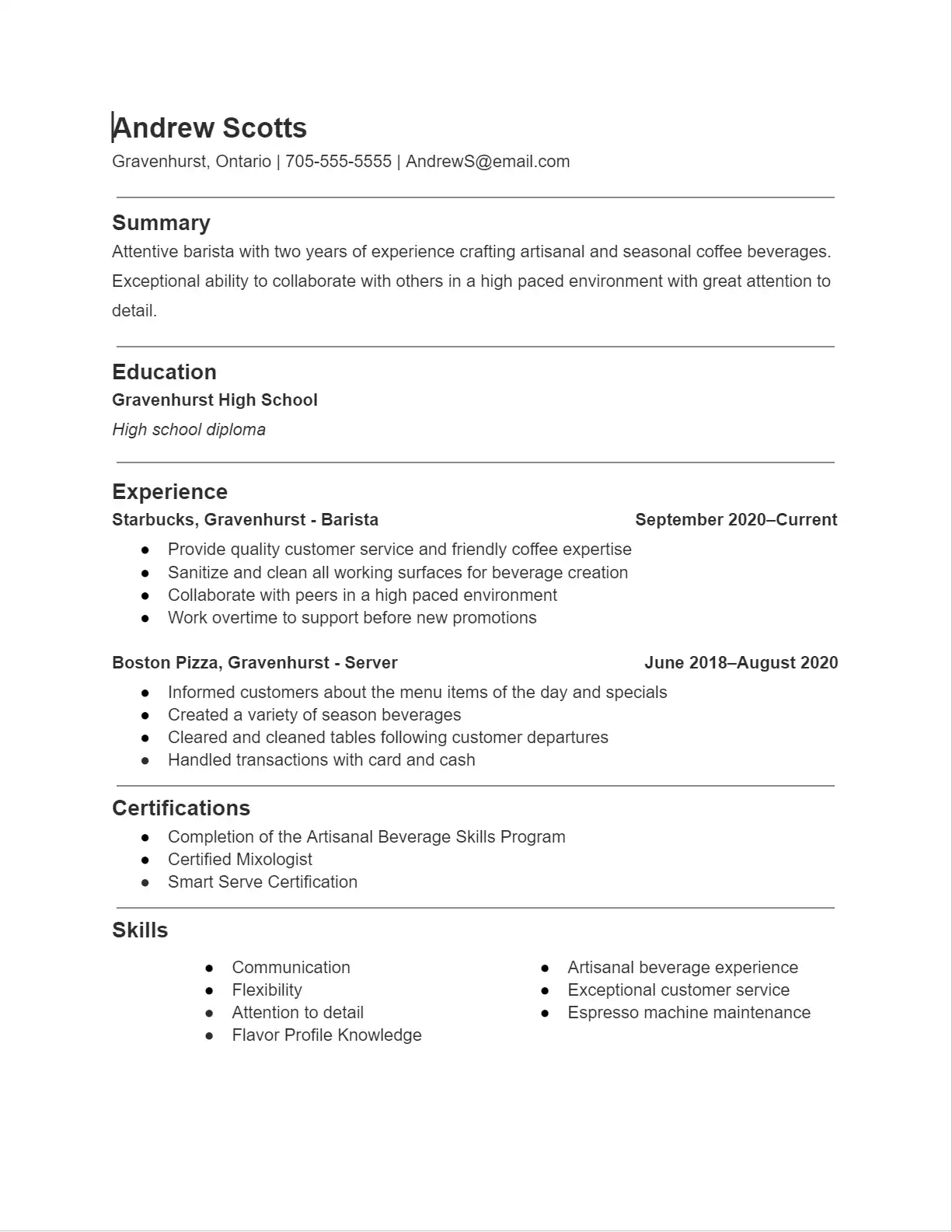
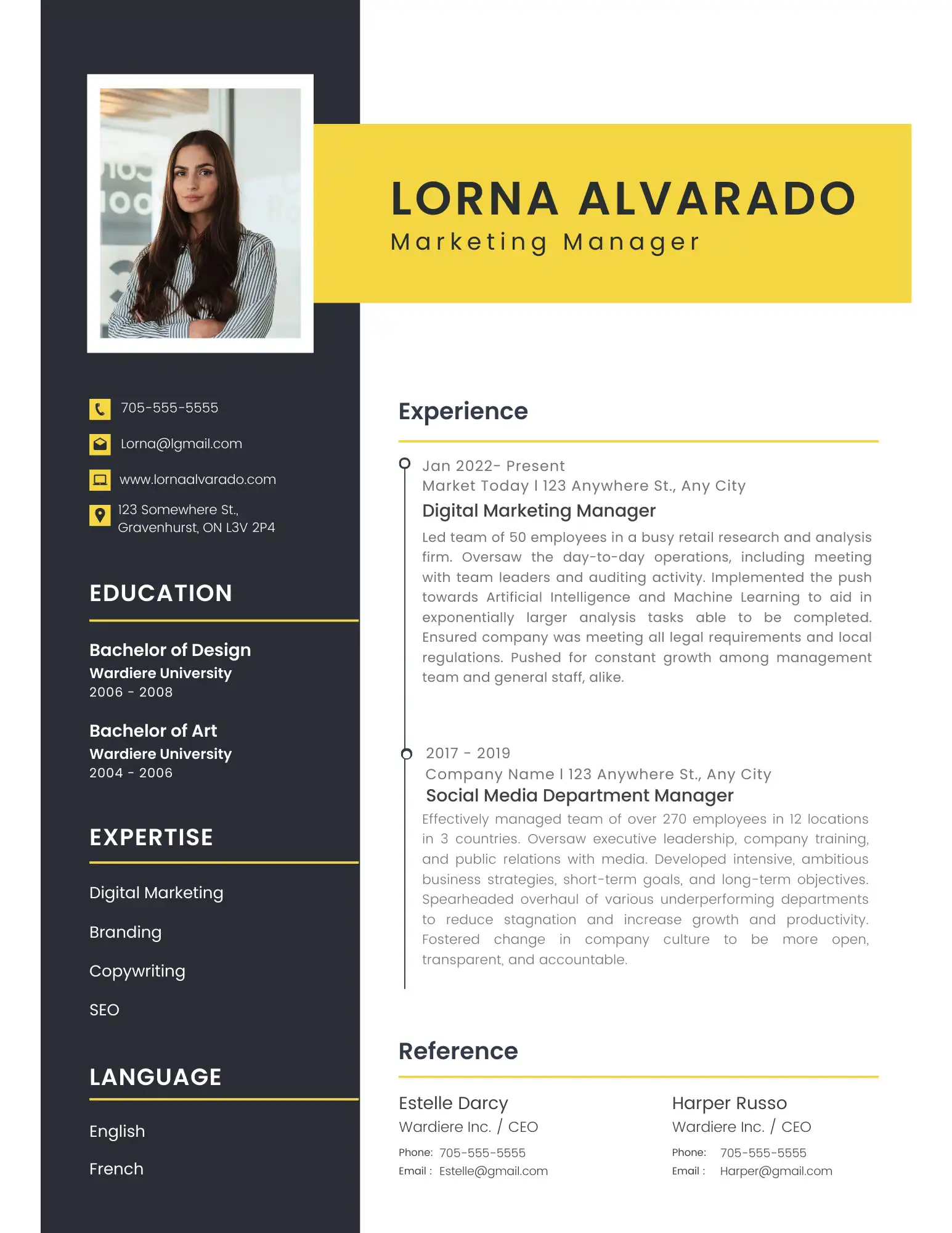
To help you get a better understanding of what a good resume looks like, here are a few real-world examples:
Barista – Google Docs
Marketing Manager – Canva
Tips for Writing a Good Resume
Now that we understand the importance of a good resume and the role of action verbs, let’s dive into some tips for writing a resume that will impress potential employers.
✅Tailor Your Resume to the Job
For example, if the job description mentions the need for someone with strong communication skills, be sure to include examples of your communication skills in your resume. This will show the employer that you have the specific qualities they are looking for.
One of the biggest mistakes job seekers make is using the same resume for every job application. While it may save time, it’s important to tailor your resume to the specific job you’re applying for. This means highlighting the skills and experience that are most relevant to the position and using keywords from the job description.
✅Keep it Concise and Easy to Read
Hiring managers often have to sift through hundreds of resumes, so it’s important to make yours easy to read and understand. Use a clean and simple layout, and avoid using long paragraphs or blocks of text. Instead, use bullet points and short sentences to make your resume more scannable.
Additionally, keep your resume to one or two pages. While it may be tempting to include every detail of your work history, it’s important to only include the most relevant and impressive information. This will help to keep your resume concise and focused.
✅Use Quantifiable Metrics
Employers want to see concrete evidence of your achievements, so it’s important to use quantifiable metrics whenever possible. For example, instead of saying “increased sales”, you could say “increased sales by 20% in the first quarter”. This shows the impact of your actions and makes your accomplishments more impressive.
✅Proofread and Edit
Before submitting your resume, be sure to proofread and edit it carefully. Spelling and grammar errors can make a negative impression on potential employers, so it’s important to ensure your resume is error-free. You may also want to have a friend or family member review your resume for a fresh perspective and catch any mistakes you may have missed.
Common Resume Mistakes to Avoid
Now that we’ve covered some tips for writing a good resume, let’s discuss some common mistakes to avoid.
❌Using a Generic Objective Statement
Objective statements are becoming less common on resumes, and for good reason. They often come across as generic and don’t add much value to your resume. Instead, use a summary statement that highlights your key skills and experience and how they align with the job you’re applying for.
❌Including Irrelevant Information
While it’s important to tailor your resume to the job, it’s also important to avoid including irrelevant information. This can include outdated skills or experience that is not relevant to the position. Keep your resume focused on the skills and experience that make you a strong candidate for the job.
❌Using Unprofessional Email Addresses
Your email address is often the first point of contact for potential employers, so it’s important to make sure it’s professional. Avoid using email addresses that are too casual or inappropriate, such as “partygirl123@email.com”. Instead, use a variation of your name or a professional email address. There are many services that allow you to easily create a new email address for free like Google or Microsoft. Let us know if you need help with creating a new email address, it is quick and easy.
The Role of Action Verbs
One of the most important elements of a good resume is the use of action verbs. Action verbs are powerful words that describe your accomplishments and responsibilities in a dynamic and engaging way. They help to make your resume more impactful and show potential employers what you can bring to the table.
Some examples of strong action verbs to use in your resume include:
- Achieved
- Developed
- Implemented
- Managed
- Resolved
- Spearheaded
- Trained
Using action verbs also helps to avoid using passive language, which can make your resume sound dull and unimpressive. Instead, focus on using strong, active language to showcase your skills and achievements.
Why is a Good Resume Important?

A good resume is crucial for several reasons:
- It showcases your skills and experience: Your resume is a chance to highlight your relevant skills and experience that make you a strong candidate for the job.
- It sets you apart from other applicants: In a competitive job market, a well-written resume can help you stand out from other applicants and increase your chances of getting an interview.
- It demonstrates your professionalism: A well-crafted resume shows that you take your career seriously and are committed to presenting yourself in the best possible light.
Conclusion
A good resume is essential for standing out in today’s competitive job market. By tailoring your resume to the job, using action verbs, and avoiding common mistakes, you can create a resume that will impress potential employers and increase your chances of landing your dream job. Remember to keep it concise, easy to read, and error-free, and you’ll be on your way to a successful job search. Employment North is here to assist you with your job search needs including help with writing a winning resume. Whether you are in Gravenhurst, Bracebridge, Huntsville or another Muskoka area, contact us today to set up a free meeting for assistance with your job search or resume.
Table of Contents
Time to Read: 8 Minutes
- Where to Create a Resume
- Microsoft Word
- Google Docs
- Canva
- Real-World Examples of Good Resumes
- Barista – Google Docs
- Marketing Manager – Canva
- Tips for Writing a Good Resume
- ✅Tailor Your Resume to the Job
- ✅Keep it Concise and Easy to Read
- ✅Use Quantifiable Metrics
- ✅Proofread and Edit
- Common Resume Mistakes to Avoid
- ❌Using a Generic Objective Statement
- ❌Including Irrelevant Information
- ❌Using Unprofessional Email Addresses
- The Role of Action Verbs
- Why is a Good Resume Important?
- Conclusion
- Table of Contents
- Our Team is Here to Help
- Contact Information
- Gravenhurst Employment Office
- South River Employment Office
More Articles
Our Team is Here to Help
Referrals are the most powerful means to getting a new job.
Contact our office for assistance with your resume, details about the positions, to increase your qualifications, and to find out what we know about local employers.
Contact Information
Gravenhurst Employment Office
2-410 Muskoka Road South
Gravenhurst, ON
P1P 1J4
Tel: 705 687-6350
1-800-461-5541
Fax: 705 687-4250
Email: janet@employmentnorth.com
South River Employment Office
131 Ottawa Ave.,
Box 2000,
South River, ON
P0A 1X0
Cell: 705-571-5264
Tel: 705-384-1110
1-800-461-5541
Fax: 705 384-2228
Email: melissa@employmentnorth.com